
BKR registration retrieval
Find out in 3 steps if you have a negative BKR registration
Want to check your BKR record? The Bureau Krediet Registratie (BKR) keeps track of consumer credit and loans in the Netherlands. Are you thinking about taking out a mortgage or loan and wondering if a BKR record might prevent you from doing so? Don’t worry! Follow the steps below to find out what your BKR record shows.
Are you negatively registered? Dynamite Netherlands can help you remove these registrations. Read more about removing BKR registrations here.
How do you request your BKR statement?
Need to view BKR registration? Follow the steps below or watch the explanation video for a visual explanation.
- Step 1: Go to the BKR website and log in with your bank account.
- Step 2: Fill in the requested information such as your name, email address and residential address. This will only take a minute of your time.
- Step 3: After logging in, you will immediately see your BKR registration. Want a detailed paper summary? You can have this sent to you by mail for a fee.
Explanation video: BKR registration retrieval
Request a free BKR statementImportant: When reviewing your BKR overview, pay particular attention to the section entitled "Special coding." A code under this heading indicates a negative registration. Such registrations may hinder your ability to obtain new credit or loans. Would you like to know how long such a registration remains visible? Read about how long a BKR registration remains in place.
These are what the codes on your BKR statement mean
If you have requested your BKR statement and it turns out that you have a registration, there could just be a certain letter- or number code might appear on the screen. Such a code is used by BKR to see at a glance exactly what type of registration is involved. There are several different BKR codes.
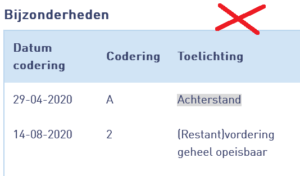
In summary applies:
- The code A if you are behind on your payments.
- The code H if you have managed to catch up on your payment arrears.
- The code 1 If you are actively working to catch up on your arrears.
- Code 2 if the lender demands payment of the entire amount still outstanding (and not just the amount in arrears).
- Code 3 if the lender decides internally to repay the amount or if the amount is waived.
- Code 4 if you have been unavailable to your lender for an extended period of time.
- The code 5 If you are slightly in arrears with your mortgage.
- The code 9 If you have a legal dispute with your lender.
Tip: Save your BKR statement so you always have it handy without having to log in again. For example, take a screenshot or print out the statement.
Want to quickly find out if you are registered without seeing the full overview? Then do a BKR check first.
BKR registration removal
Do you have a BKR registration that you consider unreasonable? Our specialized team offers support to remove unreasonable BKR registrations.
Requesting an intake interviewWhen exactly you will be registered by the BKR
Want to know exactly when you will or will not be registered by BKR? Roughly speaking, you get a registration if you borrow money for more than 1 month and if the total amount is more than 250 euros. Think of:
- Personal loans
- Revolving credits
- Phone subscriptions where you buy the phone on credit
- Being in the red on your bank account
- Purchases where you pay afterwards
- Your mortgage (if in arrears)
Read more details in our article when you get a BKR registration.
What does the BKR not register?
You don't get a BKR registration when it comes to:
- Study debt or payment arrears with the DUO
- Debt with the Internal Revenue Service
- Debt with your health insurance company
- Debt with CJIB
- Your mortgage (if you pay it off as agreed and therefore you are not in arrears)

Negative BKR registration? Send your BKR statement to us
We review your registrations and investigate whether we can help you remove them.
You can send the BKR statement as a Pdf to:
- klantenservice@dynamietnederland.nl
- WhatsApp 06 - 306 076 33
Send as a PdF file
- Via mobile: on your BKR statement you will see "print" at the bottom in blue. Click on this and save the file as a Pdf. Doesn't your device have a Pdf? Click 'print' and send the file directly to us by email or WhatsApp.
- Via computer: on your BKR statement you will see 'print' at the bottom in blue. Click this and change the print destination to 'save as Pdf' and click 'save'.
Frequently Asked Questions
Is BKR retrieval free?
How do I check my BKR statement?
How do I check my registration with BKR?
What can I do if I unfairly have a negative BKR registration?
Customers about us
Can we help you?
This page was last updated on: